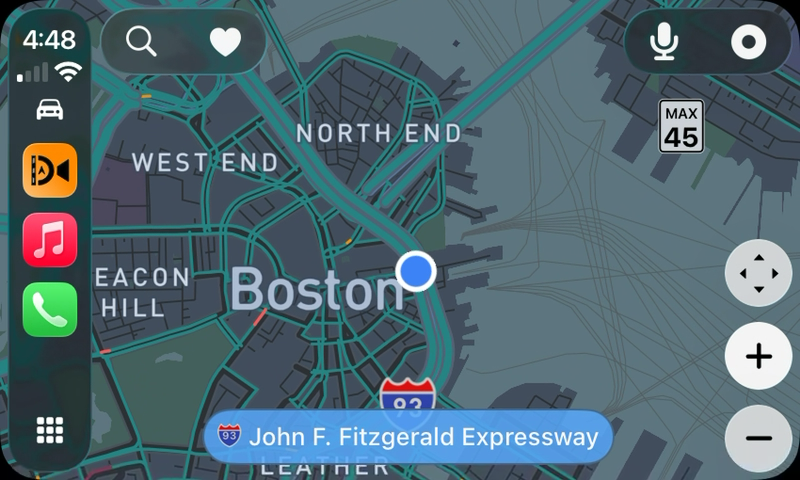
Set it up while parked, then keep the drive simple.
The phone needs a stable view of the road even when most of the interaction moves to the car display.
Mount the iPhoneSecure the phone with its rear camera facing forward and without blocking the driver’s view.
Connect CarPlayOpen DashMap from the CarPlay app grid and choose navigation or recording actions.
Confirm the cameraIf iOS requires it, open DashMap on the phone and confirm the camera preview before driving.
Drive and review laterUse the vehicle display for directions, then review the saved video and route on the iPhone after parking.
One job per screen
Know what happens where.
The distinction matters because CarPlay controls apps, but it does not provide a road-facing camera.
Task
CarPlay display
Mounted iPhone
Navigation
Shows the route and turn guidance.
Supplies location and keeps the trip context.
Road recording
Offers supported recording controls.
Uses its camera to record the road ahead.
Camera confirmation
Can direct the user to the phone when required.
Shows the camera preview and grants protected camera access.
Footage review
Not designed for detailed video review while driving.
Stores, reviews, trims, and shares footage after the drive.
Driver safety: complete mounting, camera confirmation, route selection, and other detailed setup while parked. CarPlay should reduce interaction during the drive, not move setup work onto another screen.
Best fit
Useful when your car already has a display, but not a dash cam.
Strong fit
Drivers who want one connected trip.
Your vehicle supports Apple CarPlay.
You already mount the iPhone with a clear road view.
You want navigation and recording to share destination and route context.
You prefer direct review on the phone instead of a camera companion app.
Different solution
Coverage that must work without the phone.
The recorder must start every time with no phone interaction.
You need parking surveillance after disconnecting CarPlay.
You need permanent rear or cabin cameras.
Your car does not support CarPlay or the phone cannot be mounted safely.
CarPlay dash cam FAQ
The important platform boundaries.
DashMap works within Apple’s CarPlay and camera-access rules.
Does CarPlay record dash cam video?
The mounted iPhone records the road. CarPlay provides DashMap navigation and recording controls, but the vehicle display itself is not the camera.
Can DashMap start recording from CarPlay?
DashMap provides recording actions and connection reminders through CarPlay. Because iOS protects camera access, the iPhone may need DashMap open and may require confirmation before recording begins.
Does the iPhone still need to be mounted?
Yes. The rear camera needs a secure, unobstructed forward view because the phone records the road.